
AI search analytics
AI search analytics: what the models say about you, and how many answers stand behind each number.
Buyers now ask an AI assistant which tools to look at before they ever visit your site. AI search analytics is how you find out what those answers say: whether your brand is named, which pages the model used as sources, who it named instead, and whether that is changing. Whaily runs your buyers’ questions on the models every day and reports the answers as numbers, each with the sample behind it.
What AI search analytics measures.
One AI answer is a paragraph, not a ranking, so no single number describes it. These are the numbers Whaily reports, and each answers a different question.
- Visibility
- The share of answers whose text names your brand. A link to your site does not count on its own: links are removed from the answer before your name is looked for.
- Citations
- The pages an answer linked to as its sources, counted separately from mentions. An answer can name you without citing you, and cite you without naming you.
- Cited without being named
- The answers that used a page on your domain as a source and still did not say your name. A concrete lead: the model found your page, so the work is on that page.
- Share of voice
- Of every time your brand or a tracked competitor is named, the share that is yours. The shares add to 100, so a competitor gaining is somebody losing.
- Position
- Where your name came among the brands an answer named, averaged over the answers that named you. An answer that left you out is excluded, not scored as last.
- Sentiment
- Whether an answer spoke of you positively, neutrally, negatively or both, summed into a net score from minus 100 to plus 100 for you and each competitor.
- Sources
- Which sites and pages the models cite for your questions, which models cite them, and an influence score from 1 to 100 built from how many models and prompts cite it, how recently, and other signals.
Mentions and citations are kept as separate numbers on purpose. If a report adds them together, a brand whose pages are cited while its name never appears looks healthy when it is not. For the background on why the two come apart, and on generative engine optimization in general, read our guide to generative engine optimization.
How Whaily collects the data.
The model APIs, with the version named.
Whaily sends your questions to the models through the providers’ APIs and stores the full answer with the provider, the model and the exact version that produced it. When a provider ships a new version your numbers can move with no change on your side, and the version on every answer is how you tell the two apart. The timeline marks the day a model was replaced.
Every day, on every plan.
Each tracked question runs once a day on each model you attach to it. You can type questions in one at a time or import up to 500, and Whaily proposes a first set from your domain. The first answers arrive the same day you sign up.
Repeated runs, and no number on too little data.
The same question asked twice can name different brands, so one answer is a sample. Every aggregate percentage reads N/A until at least five answers stand behind it. Share of voice is drawn with a 95 percent confidence interval on the Competitors chart. When you need a tighter answer to one question, a burst runs it many times across the models you pick and returns the mention rate with a 95 percent interval. Bursts are on the Starter, Pro, Agency and Enterprise plans with an active subscription, not during the trial, and their answers stay out of your daily numbers so a test does not bend the trend it measures.
With search and without search, kept apart.
An answer from the model’s memory and an answer grounded in a live web search are different measurements. On the Pro, Agency and Enterprise plans a question can also run with web search on one or two of its models. The two results are shown side by side and never added together.
What you see in the product.
The screenshots below come from a demo workspace that tracks a note taking app.
The trend, per model.
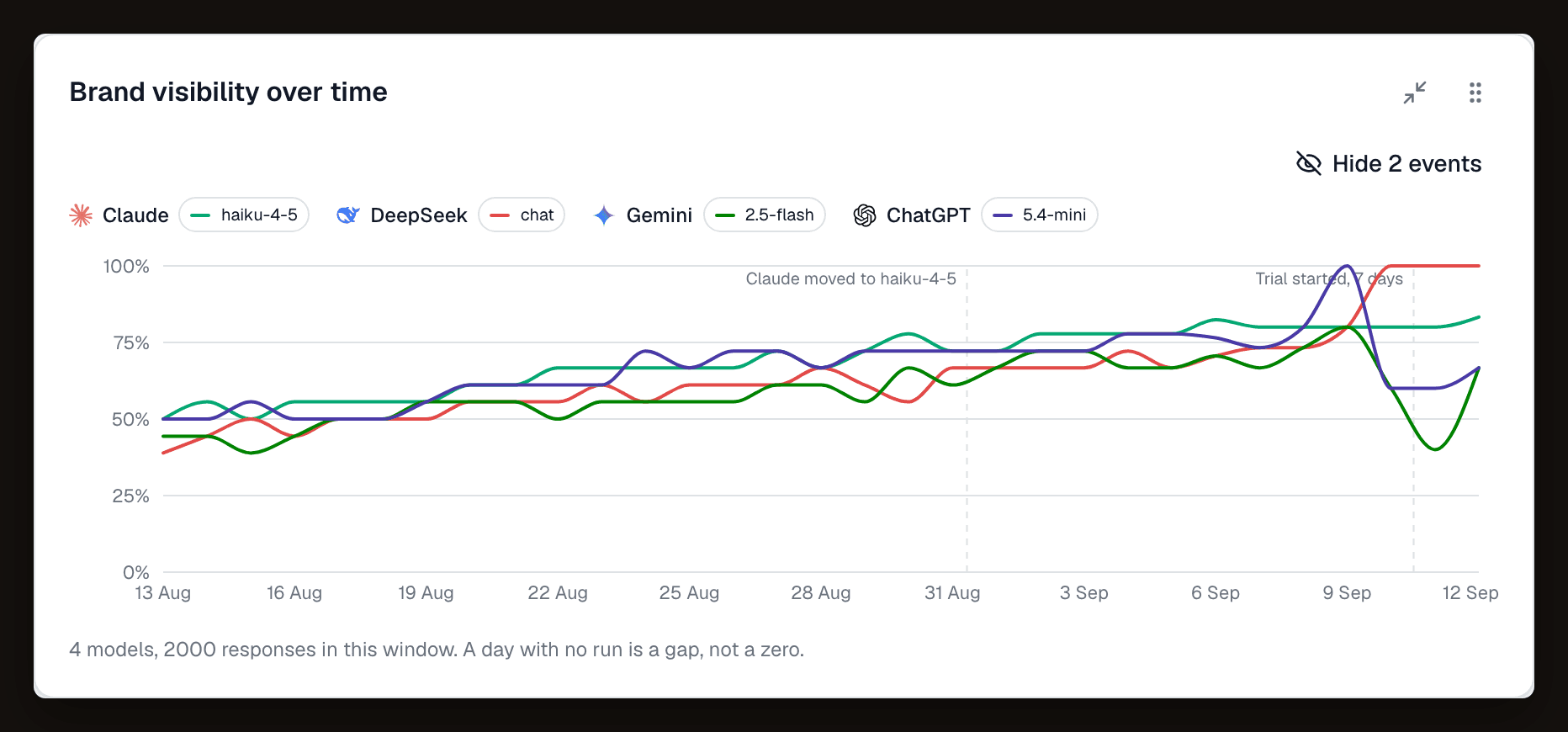
The overview shows visibility and share of voice over time, with one line per model and its version, so you can see whether a change is broad or tied to one provider.
Every answer, in full.
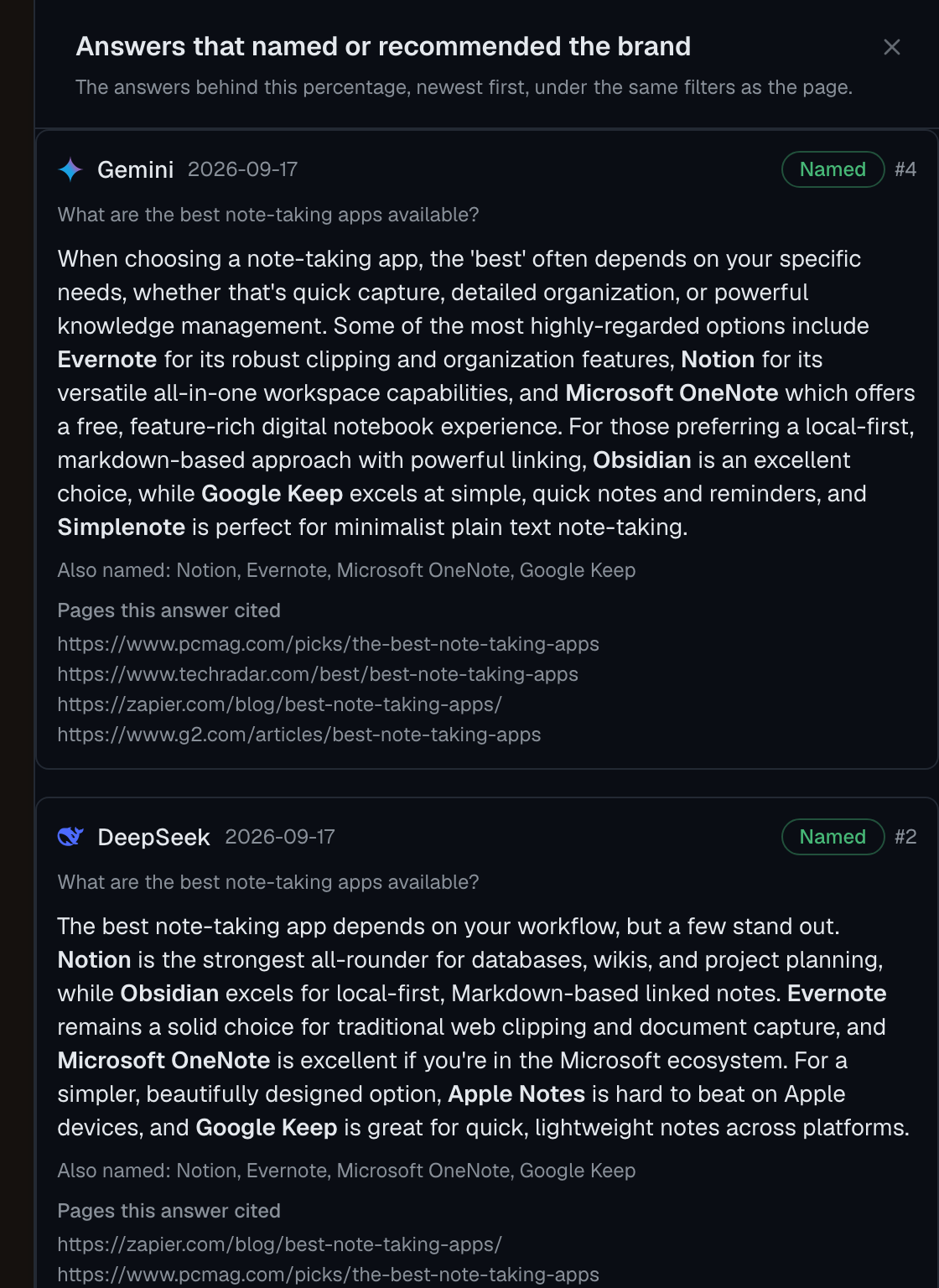
Click a number to open the answers behind it. Each one shows the model, the date, whether your brand was named and in which position, the other brands named, and the pages the answer cited, listed apart from the text. The Answers tab also lists the answers that cited your site without naming you.
The sources the models use.
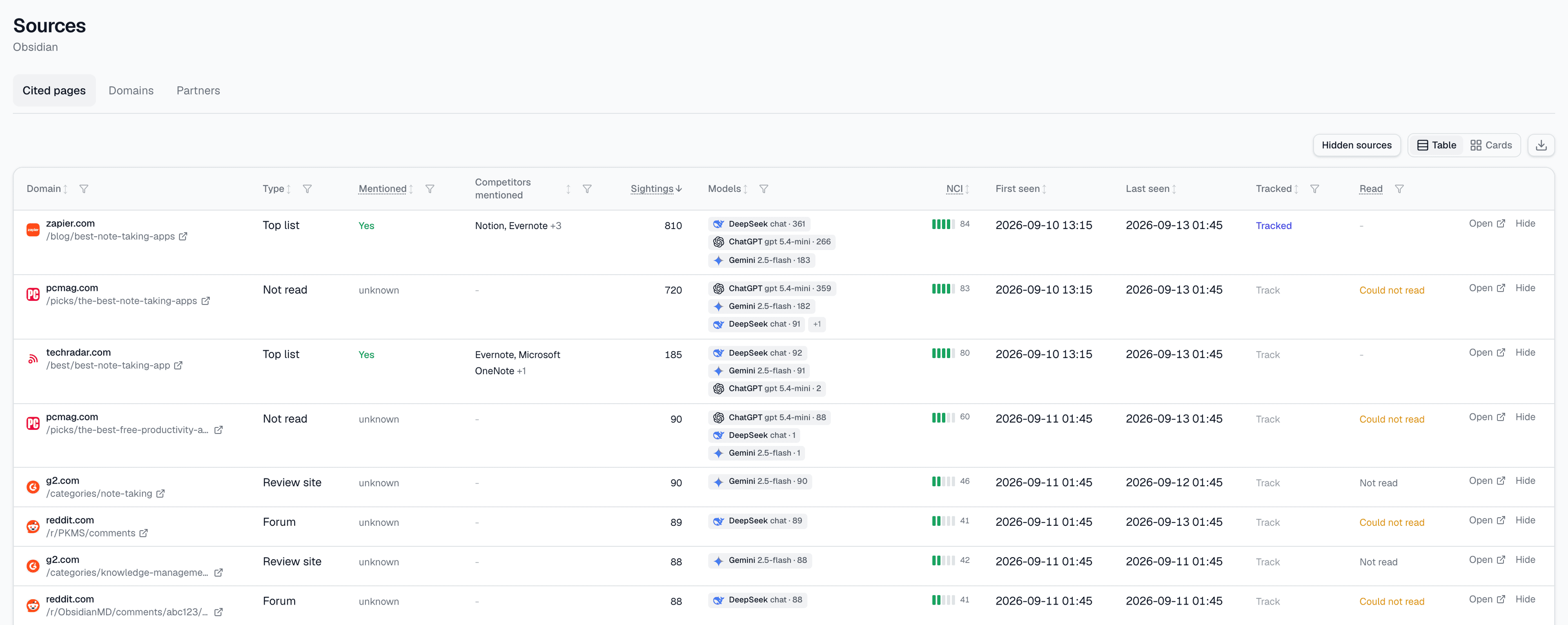
The Sources section lists every page cited in your category: its type, the brands it names, how often it was cited, by which models, and its influence score. That is where you find the review sites, comparison articles and forums worth being present on.
Competitors, sentiment and what to do next.
- Competitors sit on the same rows as you, counted by the same rule: a name in the text of the answer. See competitor intelligence.
- Sentiment, with top three share and mean place, is read for you and each competitor on the Starter, Pro, Agency and Enterprise plans. See sentiment analysis.
- An action plan, rebuilt every night from your answers and sources, ranks what to do first.
- The Report page turns a period into a few plain sentences with the figures under each, and a share link for someone who does not use the app.
What it does not measure.
- Traffic. Whaily does not read your web analytics or referrers, so it does not count visits, sign ups or revenue that came from an AI assistant. Use your analytics tool for that, next to these numbers.
- What a person sees in a chat app. Whaily does not read the ChatGPT app, Google’s AI Mode or AI Overviews, or any other logged in interface, where a system prompt, memory and routing change the answer from one person to the next.
- How often a question is asked. Whaily does not estimate how many people ask a given question. You choose the questions, and Whaily measures the answers.
- Certainty on every number. Some numbers carry a confidence interval and some do not. The method page names which are which, and where the method is weak.
What to look for in any AI search analytics tool.
If you are comparing tools, these are questions worth asking of any of them, including ours.
- Does every number name the model and version that produced it?
- Are mentions and citations reported as separate numbers?
- Does a percentage show how many answers it rests on, and refuse to show one on too few?
- Can you open the full answer behind any figure?
- Are answers with web search kept apart from answers without it?
Frequently asked questions.
- What is AI search analytics?
- It is measurement of how AI models answer the questions your buyers ask: whether they name your brand, which pages they cite as sources, where you rank among the brands they name, and how they describe you. It differs from web analytics, which measures visits to your site, and from rank tracking, which measures positions in a list of links.
- Does Whaily show traffic from ChatGPT or other assistants?
- No. Whaily does not read your web analytics or referrer data, so it cannot tell you how many visits or sign ups came from an AI assistant. Your own analytics tool is the place for that. Whaily measures what the models say, which is the step before a visit.
- Is what Whaily records the same as what my buyers see in ChatGPT?
- Not exactly. Whaily calls the models through their APIs and records the exact model version. A logged in chat app adds its own system prompt, memory and routing, so one person can see a different answer from another. The API is the comparable view; the app is the personal one.
- How many prompts do I need?
- There is no fixed number. Cover the questions a buyer asks before a shortlist, in their words: category questions, comparison questions and problem questions. Keep questions that already contain your brand name apart, since they say little about whether a new buyer would find you. How many prompts each plan tracks is on the pricing page.
- Why does a number show N/A?
- Every aggregate percentage needs at least five answers behind it. Below that it reads N/A rather than a figure such as 100 percent from a single answer. Five is a floor that stops a number from being shown on almost nothing, not a promise of precision.
- Which models can I track?
- Models from OpenAI, Anthropic, Google, Perplexity, DeepSeek and xAI, each recorded by provider, model and exact version. Which versions your plan reaches is listed on the models page.
See what the models say about your brand this week.
Add the questions your buyers ask and the models to track. The first answers arrive the same day.