
Investigations
Find out why an AI answer changed, with the evidence attached.
Start an investigation on any AI visibility move that looks off, and Whaily lays out the evidence instead of a guess. Five deterministic analysers compare a before-and-after window across visibility, prompt movement, citations, competitors and model mix, plus sentiment, then rank the likely causes with the data rows behind each one.
 ChatGPT
 Claude
 Gemini
 Perplexity
 DeepSeek
 Grok
GrokThe problem
A number moving is not an explanation.
Visibility drops three points and the obvious move is to ask an AI chat assistant why. It will give you a fluent answer. It was not there when your data changed and it cannot see your prompts, your sources or your competitors. That answer is a guess dressed up as an explanation. Investigations exist to replace the guess with evidence.
How it works
From sign-up to signal in minutes.
Start an investigation three ways
Open one from any chart that looks wrong, let an alert rule start one automatically when it fires, or ask for one through MCP (the protocol that connects an AI assistant to Whaily) if your team has that set up. Every investigation lands on the Investigations tab of the Action plan section, next to the recommendations and the board, so the reason for a move sits beside the work it leads to.
Five deterministic analysers compare before and after
Visibility, prompt movement, citations, competitors and model mix are each checked by their own analyser, alongside a sentiment check. Every analyser compares a before window to an after window and produces ranked hypotheses, each with the rows of data that support it.
One AI call writes the summary, marked as its own step
After the analysers finish, a single AI call runs to write up what they found in plain language. It is gated by your plan and a spend cap, and shown as its own step so you always know which part of the investigation is deterministic and which part is generated.
What you get
Everything you need, in one place.
Start from a chart, an alert or a question
Open an investigation from any number that looks wrong, from an alert rule that fired, or by asking through MCP if your team uses an MCP-connected assistant.
Five deterministic analysers
Visibility, prompt movement, citations, competitors and model mix are each checked on their own, comparing a before window to an after window.
Sentiment checked alongside the rest
A sentiment analyser runs with the other five, so a tone shift is caught even when the visibility number itself barely moved.
Ranked hypotheses with the rows behind them
Each hypothesis is ranked and shipped with the actual data rows that produced it, not just a written conclusion.
One AI call, gated and clearly marked
A single AI call writes the final summary, controlled by your plan and a spend cap, and labeled as its own step so it is never mistaken for a deterministic finding.
Every step is reviewable
Open any step of an investigation, deterministic or AI-written, to see what it checked and why it reached that conclusion.
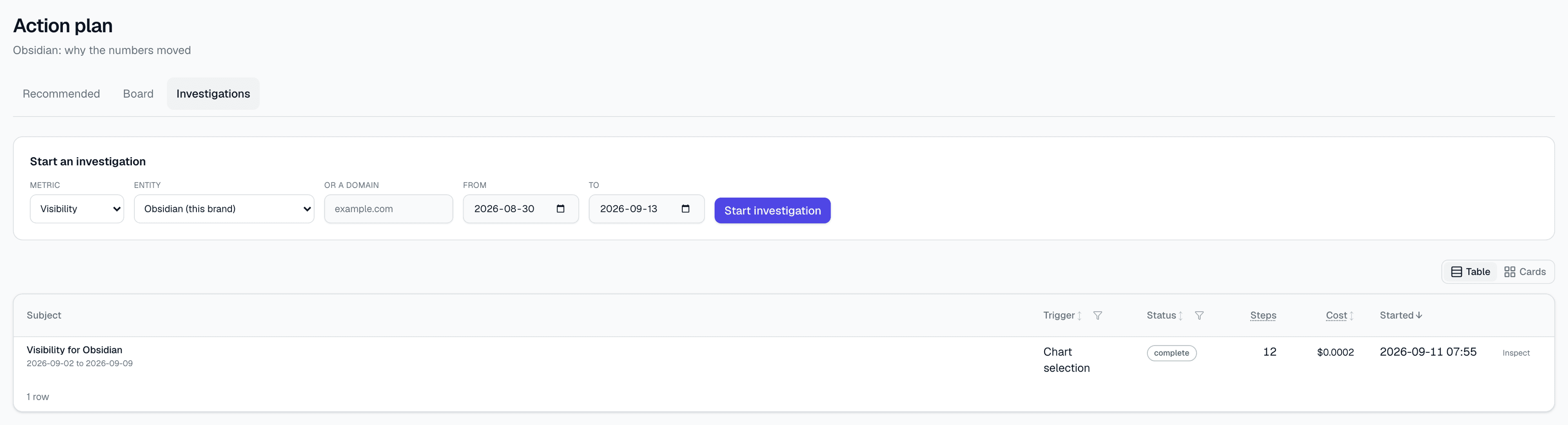
See every investigation in one place.
Open investigations with their status, the window they compare, and the top-ranked hypothesis at a glance.
Why it matters
AI answers move for reasons you can see, if someone lays out the evidence.
An AI visibility number rarely moves for no reason. A model was upgraded, a competitor picked up a new citation, a prompt drifted into a different topic, a source you rely on lost weight. The reason is usually in the data already. The problem is that finding it by hand means opening several different reports and holding the before-and-after comparison in your head.
Investigations do that comparison for you, with fixed logic. Five analysers, visibility, prompt movement, citations, competitors and model mix, each compare a before window to an after window and produce hypotheses ranked by how well they explain the change, alongside a sentiment check. Because the logic is deterministic, the same before-and-after data produces the same hypotheses every time, and every hypothesis comes with the rows that back it.
Only the very last step is generative: one AI call writes the finding up in plain language, and it only runs within your plan allowance and a spend cap. It is marked as its own step on purpose, so nothing deterministic gets mistaken for something the model just guessed, and nothing the model wrote gets mistaken for a hard number. A chat assistant that guesses why your visibility dropped is not evidence. A ranked list of hypotheses with the rows behind them is.
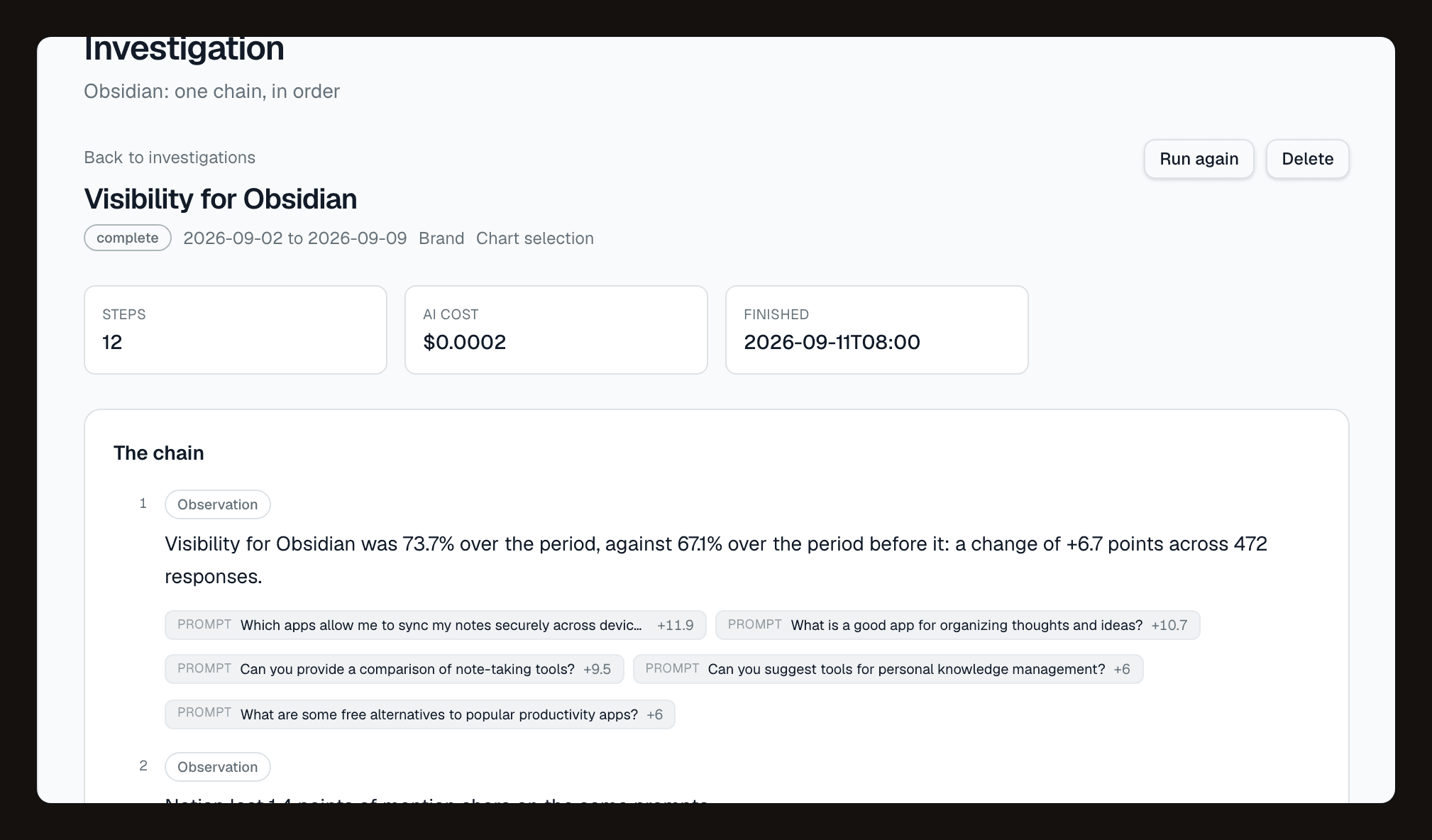
Every hypothesis comes with the rows behind it.
Five analysers plus sentiment, each producing ranked hypotheses and the data rows that support them, with the AI-written summary shown as its own, clearly marked step.
Questions
The short answers.
How do I start an investigation?+
What do the five analysers actually check?+
Does AI write the whole investigation?+
What happens if my plan or spend cap blocks the AI step?+
Can I check the evidence myself instead of trusting the summary?+
Can I start an investigation from outside Whaily?+
Ready to be recommended by AI?
Start free. See your first insights in minutes.