
Several brands
Every brand you own, under one login and one plan.
Add a second brand and it joins your account: same plan, same team, same prompt allowance. A portfolio page shows how each brand is doing, and one list shows every prompt across them with the brand beside it.
 ChatGPT
 Claude
 Gemini
 Perplexity
 DeepSeek
 Grok
GrokThe problem
A company is rarely one brand.
A group with four product brands, a founder with two companies, a marketing team that inherited a sub-brand last quarter: most tools make each one a separate account with its own bill and its own login, and the person responsible for all of them ends up with a spreadsheet to compare them. The numbers that matter across the set never sit on one screen.
How it works
From sign-up to signal in minutes.
Add a brand from the sidebar
Enter its website and Whaily reads a few pages, proposes prompts and competitors, and tells you before you confirm that the brand joins your account on your current plan, sharing its prompt allowance. No second trial, no second invoice.
Switch, or see them all at once
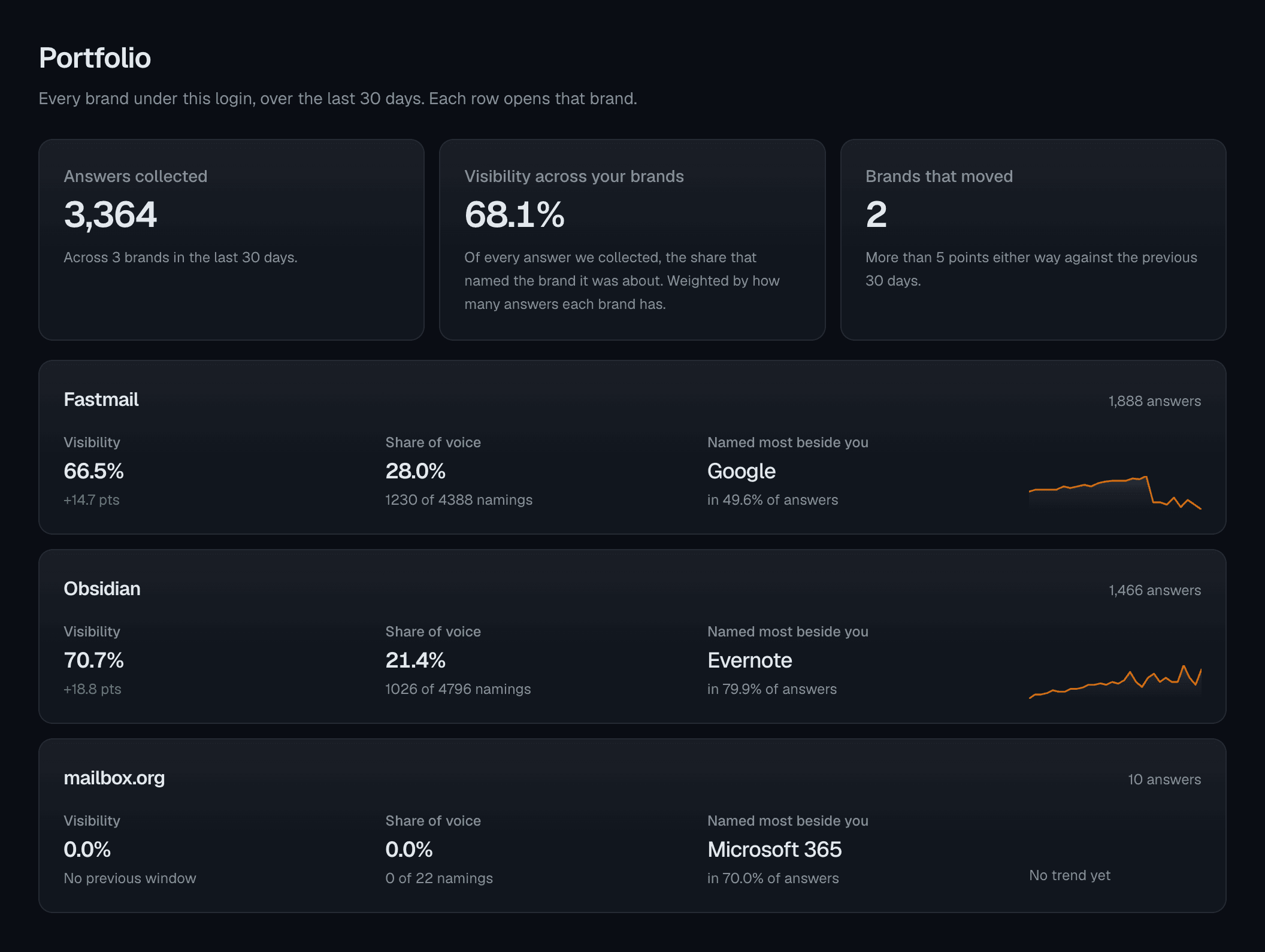
The brand switcher moves you between brands without signing out. The Portfolio page puts every brand on one screen: visibility, its change since the previous window, share of voice and the biggest movers.
Budget prompts across the set
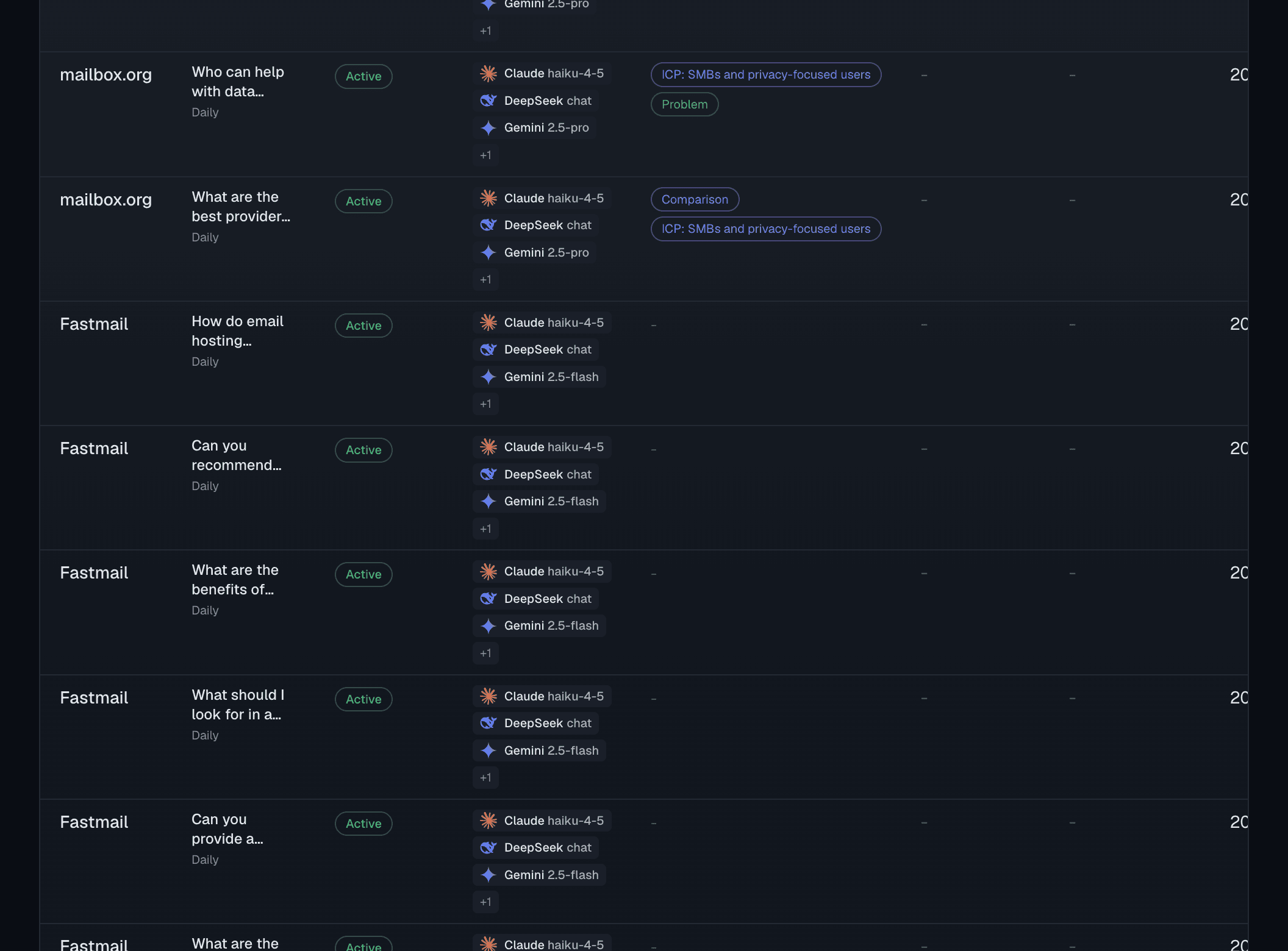
Your plan holds one prompt allowance for the whole account. The All brands list shows every prompt with its brand, how much of the allowance is in use and what is left, and where a new prompt should go.
What you get
Everything you need, in one place.
Brands are in the price
Pro holds up to 3 brands and Enterprise up to 15, all on the one plan. What is shared is the prompt allowance, so the meter is prompts, never a per-brand fee.
A portfolio page
Visibility per brand for the window, the change against the previous one, share of voice, responses and the top competitor, with the set summed and weighted above the rows.
One list of every prompt
The All brands tab shows every tracked prompt across the account with the brand on each row, a brand filter for the narrow case, and a link into the brand a new prompt belongs to.
One team
Everyone on the account sees every brand in it. A colleague added to the account is on the new brand the moment it exists, with the role they hold on the account.
Alerts stay per brand
Notification rules and digests remain per brand, so the person who owns one brand hears about that one, and the person who owns the set hears about each.
Kept apart from agency work
A client brand an agency reaches through a link is a different customer with its own plan and its own allowance. It never joins the agency's portfolio, and its sibling brands never show.
Every brand on one page.
The Portfolio: one row per brand with visibility, change since the previous window, share of voice and the top competitor, and the set summed above them.
Why it matters
One plan, one meter, no second trial.
The rule is simple enough to say in one sentence: brands are included in the price and prompts are what you pay for. A Pro account holds up to 3 brands and Enterprise up to 15, and all of them draw on the same prompt allowance. That keeps the bill honest, because the cost of running Whaily scales with the prompts it tracks, not with how many names a company trades under.
It also changes what a second brand gets when it is added. It gets the account, not a trial of its own: the same plan, the same allowance, the same team. The confirm step says so before you press the button, in the numbers you are actually deciding about, how much of the allowance is in use across your brands and how much is left. Nothing is promised that the account does not already have.
Because the allowance is pooled, a page scoped to one brand cannot tell you how many prompts you have left or where they went. The All brands list can, and the Portfolio page answers the question above it: across everything we own, what moved. Both read only the brands on your account. A brand an agency reaches through a client link belongs to that client, keeps that client's plan, and never appears beside anyone else's.
Every prompt, with the brand beside it.
The All brands list: how much of the shared allowance is in use and what is left, a link to add a prompt to each brand, and the Brand column on every row.
Questions
The short answers.
How many brands can one account hold?+
Does a second brand get its own trial?+
Is the prompt allowance per brand or per account?+
What happens when the allowance is full?+
Who on the team sees which brands?+
Ready to be recommended by AI?
Start free. See your first insights in minutes.